
How to transcribe, translate and convert a sequence
Select a drawn peptide or strand, or text holding a sequence, and open Sequence in the bar above it. A DNA strand offers Transcribe and Replicate, an mRNA offers Translate, and a peptide offers three- or one-letter codes and Back to an mRNA.
Steps
Select the sequence: a peptide or strand drawn with Build from a sequence, or a text block holding one.
In the bar above the selection, open Sequence. It lists only what fits what you selected.
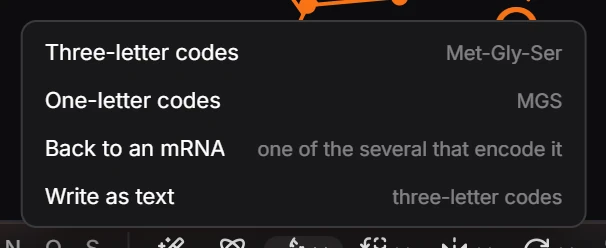
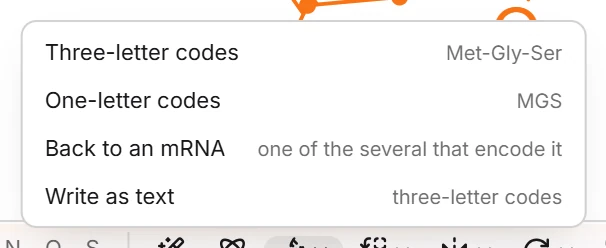
Choose an action. A notice says what the result is, for example "The mRNA, 5′ to 3′".
What each sequence offers
| Selected | Actions |
|---|---|
| DNA | Transcribe, as the template strand (the mRNA is its complement) · Transcribe, as the coding strand (the same sequence with U) · Replicate (the complementary strand, written 5′ to 3′) |
| mRNA | Translate (the protein from the first AUG to the first stop) |
| Peptide | Three-letter codes (Met-Gly-Ser) · One-letter codes (MGS) · Back to an mRNA (one of the several that encode it) |
| Text holding a strand | Also Flip 5′ and 3′: the same strand, written the other way round |
| A drawn sequence | Write as text: the sequence as text, three-letter codes for a peptide, 5′ to 3′ for a strand |
| A sequence as text | Draw as a structure: the peptide or strand in full |
When an action cannot apply, it is shown but greyed, with the reason: Translate says "There is no AUG start codon", and Back to an mRNA says "Only the twenty standard amino acids have codons".
To compare two sequences, see align two sequences.
Is this helpful?
Last updated Nov 15, 2026
- Still stuck? Read the FAQ or contact support.
- Something wrong on this page? Tell us.
- For AI tools: llms.txt